

Clinic management software

Hello, iClinic speaking.

iClinic keeps a clinic's appointments, records, prescriptions, payments and stock in one place. Ask anything you like below.

Example: How does reception check patients in?Example: Is prescribing in iClinic quick?Example: How do patients book in the app?

Rather talk to a person? Book a demo or message us on Zalo.

Used every day at Phòng khám Hiệp Lợi
The visit list in iClinic: each visit has a number, the patient's name with a New, Existing or Follow-up tag, a service and a status of New, With the doctor or Done
Numbered each day The whole clinic sees it
The prescribing screen in iClinic: prescription templates and each medicine with its stock on hand
Stock shown as you prescribe Warns on an allergy match
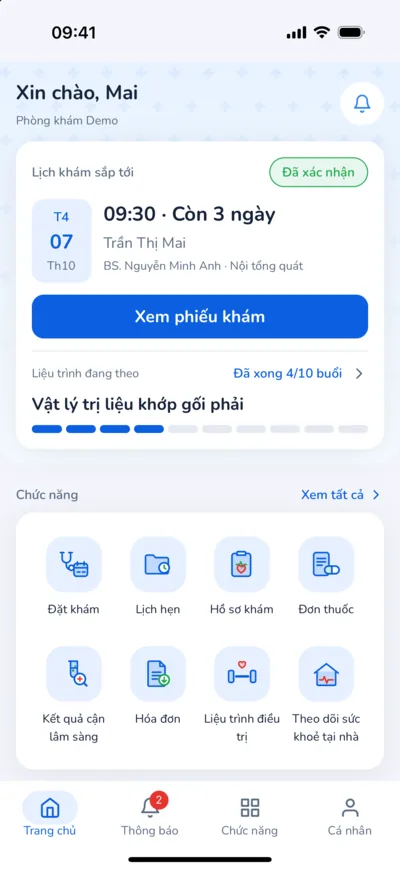
The iClinic patient app home: the next appointment, the course in progress and the feature tiles
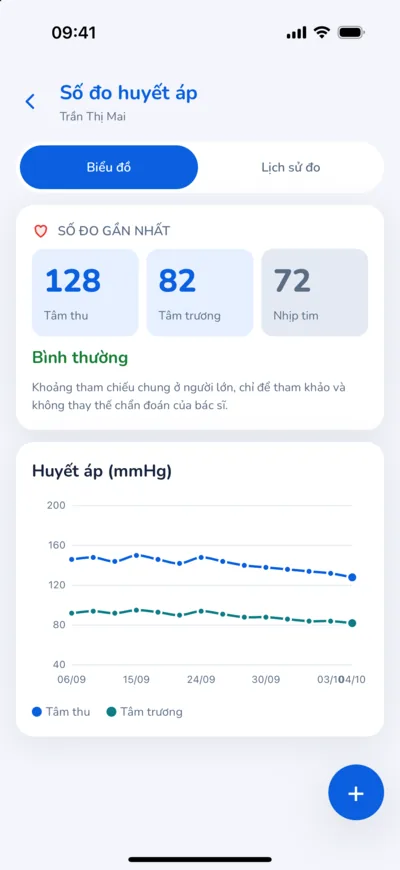
Blood pressure in the iClinic app: the latest reading and a chart over time
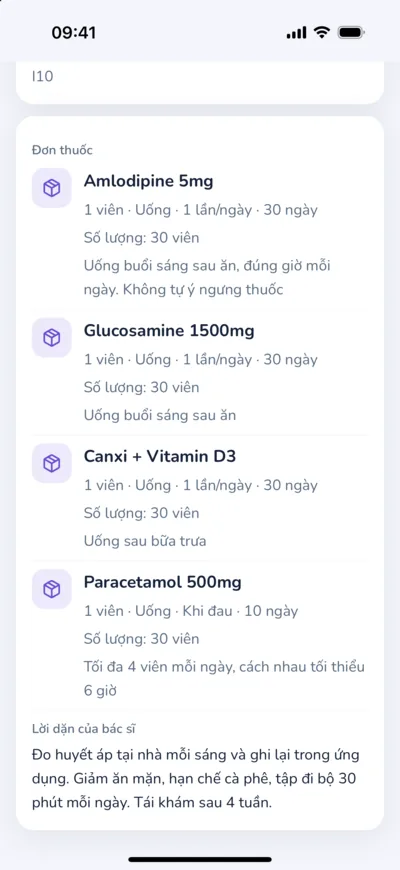
A prescription in the iClinic app: each medicine with how to take it and the doctor's advice
Request an appointment Prescriptions, home readings

iPhone Duo

Folded, a phone. Open, a big screen.

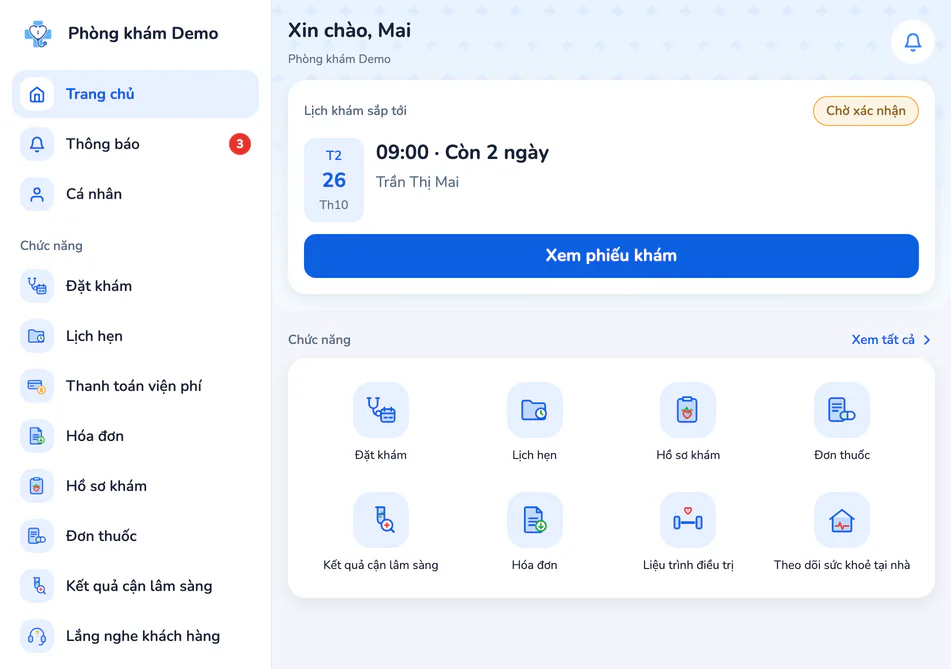
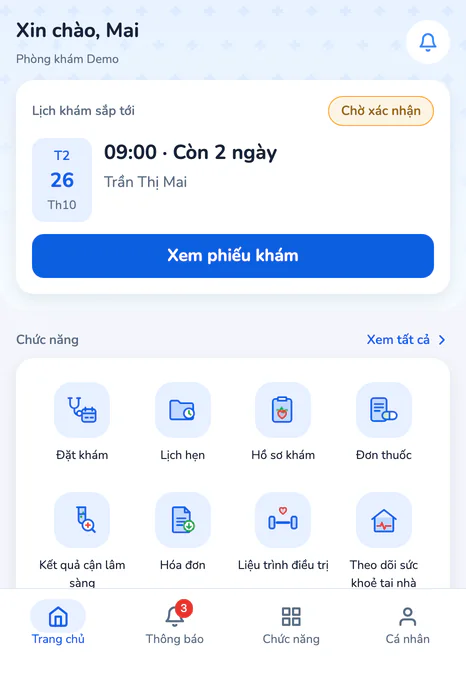
The patient app on the iPhone Duo. Folded: the phone home screen with its tab bar. Open: a sidebar with Home, Notifications, Profile and every function, the home screen beside it.

Partner

Used by our partner clinic every day.

iClinic is built with Phòng khám Hiệp Lợi, a musculoskeletal specialty clinic in Tân Phú, Ho Chi Minh City. What its staff report comes back as updates. When the clinic moved to iClinic, its data came over from the old software, so nobody had to start again from scratch.

Visit the clinic

Are you a patient who wants to book a visit? Go to phongkhamhieploi.vn.

The front of Phòng khám Hiệp Lợi, with five people standing at the door
A doctor of Phòng khám Hiệp Lợi in surgical scrubs, arms crossed under the operating light

Photos from phongkhamhieploi.vn

Phòng khám Hiệp Lợi · musculoskeletal specialty clinic

Address
262/3 Lũy Bán Bích, Tân Phú ward, Ho Chi Minh City
Hours
Mon–Thu 8:00–19:00 · Fri 8:00–16:30 · Sat, Sun 8:30–19:00

Features

Open each feature and look.

Six feature groups, along the patient's path. Every screen is a capture of the software itself.

The visit list in iClinic: each visit has a number, the patient's name with a New, Existing or Follow-up tag, a service and a status of New, With the doctor or Done
Numbered each day The whole clinic sees it

Available

Quick check-in, a clear queue.

  • A two-step visit form for walk-ins, numbered automatically for the day.
  • Book appointments; approve or decline requests patients send from the app.
  • Check in straight from an appointment: the record is linked and the booking moves to “Arrived”.
  • The visit list, newest first, filtered by date and status; the Overview screen adds today's figures and 7, 14 or 30-day charts.
The exam screen in iClinic: vital signs and BMI, record templates, history, clinical examination and an ICD-10 diagnosis
Prints as form 15/BV-01 ICD-10 codes and templates

Available

Outpatient records in form 15/BV-01.

  • Outpatient record in form 15/BV-01 (Appendix XXVIII, Circular 32/2023/TT-BYT): preview, print, save as PDF and export to Word.
  • History, vital signs with a trend chart, and diagnoses from the Vietnamese ICD-10 list.
  • Attach images and PDF results; see past visits without leaving the visit.
  • Draft, awaiting signature, signed. Changes after signing need a reason, and iClinic keeps the before and after.
The prescribing screen in iClinic: prescription templates and each medicine with its stock on hand
Stock shown as you prescribe Warns on an allergy match

Available

Prescribe from stock, print names patients can read.

  • Pick medicines from the stock list and see what is in stock as you prescribe.
  • Template prescriptions for common conditions.
  • Blocks duplicates and amounts above stock; asks for confirmation, with a reason, when a medicine matches a reported allergy.
  • A print name per medicine, used on prescriptions and receipts.

Coming soon

  • Sending prescriptions to the national system
Settling a visit in iClinic: the charges, the discount and the amount to pay
Print the receipt Cash or bank transfer

Available

Clear payments, every cancellation and refund explained.

  • Take cash or a bank transfer and print the receipt.
  • Per-line discounts; deposits and outstanding balances.
  • Cancelling or refunding needs a reason; a refund puts medicines back in stock.
  • Cash book and debts; admins see daily or monthly revenue; CSV export.

Coming soon

  • E-invoices
  • QR payments
Stock in iClinic: low-stock warnings and recent receipts
Flags items below your minimum Earliest expiry goes out first

Available

Stock by lot and expiry date.

  • Stock receipts with lot, expiry date, cost and supplier.
  • Stock by lot; the lot that expires first goes out first.
  • Low-stock alerts at each item's own threshold.
  • A price list for services, medicines and supplies, with CSV import; every price change is logged.
The iClinic patient app home: the next appointment, the course in progress and the feature tiles
Blood pressure in the iClinic app: the latest reading and a chart over time
A prescription in the iClinic app: each medicine with how to take it and the doctor's advice
Request an appointment Prescriptions, home readings

In testing on iOS

An app for your patients.

Patients stay in touch with the clinic between visits. The iOS app is in testing (TestFlight) and not on the App Store yet. Each clinic needs its own app build and Zalo account set up.

  • Booking requests that follow each doctor's timetable, confirmed by reception in iClinic.
  • Past visits, prescriptions, results and receipts, for the patient and their family.
  • Log blood pressure, weight and blood sugar at home; set medication reminders.
  • An assistant that answers about the clinic, the patient's own record and general health topics, and never diagnoses or prescribes.

Coming soon

  • Online payment
  • Video visits

Also included

The work around the visit.

Treatment courses

Multi-session courses, one tap per session, and payment for the course.

Vaccinations

Record doses and the next-dose date, which patients can see in the app.

Notices

Write, send or schedule notices to patients on the app.

Reports

Cash book, debts and revenue reports (admin), with CSV export.

Admin

Staff, role-based accounts, rooms and specialties, the audit log.

API access

Lets other software read the visit list with an API key. API docs

AI assistant

Two assistants that answer and suggest.

One assistant is for staff, the other for patients. Neither does anyone's job for them: writing records, prescribing and taking payment stay with clinic staff.

For clinic staff

Press Ctrl+K (⌘K on a Mac), just ask.

The assistant opens on every iClinic screen and answers for the asker's role.

  • How to do something in the software, and procedures the clinic's admin has written.
  • For doctors: history summaries, record drafts, diagnosis code suggestions.
  • It never opens visits, books, takes payment or edits records; it points to the right screen.
The AI assistant open beside the prescribing screen: history summary, exam draft, ICD suggestion and how-to help
Ctrl+K or ⌘K on every screen Sees only what you may see

For patients

An assistant in the app.

It answers patients about the clinic, their own record and general health topics. The app is in testing on iOS. From the next update, patients give a separate permission before their first question and can withdraw it at any time.

  • Repeats prescriptions, appointments and clinic information, and can suggest which specialty to see.
  • Never diagnoses, prescribes, interprets results or changes doses in a doctor's place.
  • Points to 115 when something sounds like an emergency.
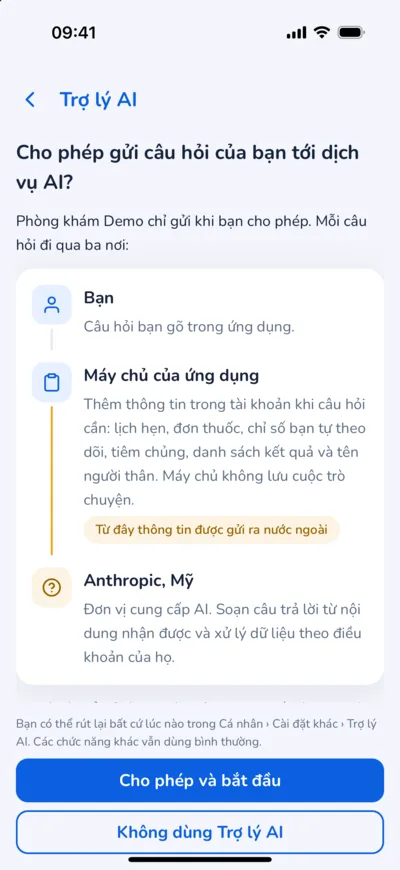
The AI assistant permission screen in the iClinic app: a question goes from the patient through the app's server to Anthropic, with Allow and Do not use buttons
The patient allows it first Withdraw it any time

Ask iClinic

How the ask box on this site works.

Updated 3 October 2026

Who is answering

An AI assistant, labelled “iClinic AI · Virtual assistant” as the AI Law 134/2025/QH15, Article 11, requires. It answers only from product documents the iClinic team writes, with sources, and says so when they don't cover something.

Where your question goes

Through iClinic's server to Anthropic (USA), the AI processor. iClinic's servers keep no question text; Anthropic handles and retains it under its own policy. The conversation lives only in this tab.

Personal details

A question with a phone, ID or insurance card number, an email or a long run of digits is stopped on your device and not sent. Google Analytics only counts usage and never receives the question (Privacy policy).

What it won't answer

No quotes, no contract promises, no health advice; it points to 115 in an emergency. Answers are for reference (Terms of use).

Compliance

Every requirement, where it stands.

Where iClinic stands on each legal requirement for clinics, with the source. Electronic-record software has no certification procedure today, so iClinic never says “certified”.

Updated 3 October 2026
RequirementSourceStatus
Outpatient record in form 15/BV-01 Circular 32/2023/TT-BYT, Appendix XXVIII

Available

Preview, print, save as PDF and export to Word.Ask more
Logging user actions on electronic records Official Letter 365/TTYQG-GPQLCL, Section III.1.1(đ)

Available

The log keeps every change to patient files, records, prescriptions, receipts and stock, and every record view; it cannot be edited or deleted.
Telling users they are using an AI assistant AI Law 134/2025/QH15, Article 11(1); Decree 142/2026/NĐ-CP

In progress

The in-app assistant is labelled “AI assistant”; Ask iClinic shows “iClinic AI · Virtual assistant” when AI answers. The patient-app assistant is renamed “AI assistant” in the next app update.
Electronic medical records (deadline for clinics: 31 December 2026) Circular 13/2025/TT-BYT, Article 4(2)(b)

In progress

Electronic outpatient records, in-app signing and a trail of every view and change are in place. In progress: electronic confirmation under Article 3 and data exchange exports.
E-prescribing and sending prescriptions to the national system (deadline: before 1 January 2026) Circular 26/2025/TT-BYT, Article 12(6)(d); Article 13(3)(b)

Coming soon

Doctors already prescribe and print in iClinic. Sending prescriptions to the national system and signing them digitally are coming soon.Ask more
Personal data protection; health data is sensitive data Personal Data Protection Law 91/2025/QH15, Article 26; Decree 356/2025/NĐ-CP, Article 4(1)(d)

In progress

Role-based access, the audit and record-view logs, and encrypted off-site backups are in place. The remaining measures are being completed.Ask more
E-invoices Decree 254/2026/NĐ-CP; Circular 91/2026/TT-BTC

Coming soon

Today reception prints receipts in iClinic.Ask more
Health insurance visit data Decision 130/QĐ-BYT (as amended)

Coming soon

The record holds the insurance card number; nothing is sent to the insurer yet.Ask more

This page describes the product; it is not legal advice.

Questions

Common questions.

What clinics ask most before using iClinic.

The product

iClinic is for private clinics, general or specialist, from one doctor to several. Reception, doctors and the manager all work on the same patient record.

It runs in a browser, so the clinic needs computers with internet and no server.

No. Staff sign in to iClinic in a browser (Chrome, Edge or Safari) on a computer, tablet or phone. Prescriptions, receipts and records print on the clinic's existing printer.

Yes, with each branch set up as a clinic of its own, with its own accounts and data in iClinic. A shared view across the whole chain is not available yet; it is coming soon.

When a patient walks up to the desk, reception opens a visit straight away. When the patient has booked, reception presses Check in on the appointment to start from the booked record. Each visit has a number for the day, and everyone in the clinic can see which visits are new, in progress or finished.

Every appointment, including requests patients send from the app, moves through Pending, Booked, Arrived and Completed.

The outpatient record follows the layout of form 15/BV-01. It prints or saves to PDF from the browser, and exports to Word.

Doctors save a draft, send it for signing, then sign. Changing a signed record needs a reason, and iClinic keeps the text from before and after the change.

Doctors pick medicines from the clinic's stock list, or reuse a template prescription for common conditions. iClinic blocks the same medicine twice and quantities above what is in stock. When a medicine matches an allergy the patient reported, it asks for confirmation.

Each medicine can have its own name for printing on prescriptions and receipts.

Once the doctor saves the orders and prescription, reception sees what to charge. Reception takes cash or a bank transfer, applies a per-line discount if needed, then prints the receipt. The cash book is under Reports; daily or monthly revenue reports are for admins.

Cancelling a receipt or refunding needs a reason, and both are logged.

Yes. Every stock receipt records quantity, cost, lot, expiry date and supplier. When stock goes out, the lot that expires first goes first.

Medicines leave stock automatically when reception takes payment, and a refund puts them back. Each item has its own threshold, and iClinic flags low stock below it. Alerts for lots close to expiry are not available yet.

Staff press ⌘K (Ctrl+K on Windows) to ask how to do something in the software, ask about the clinic's own procedures, or look up a patient or an ICD-10 code. Reception and admins can also look up service prices. For doctors, the assistant summarises the history, drafts the record and suggests diagnosis codes.

The assistant only reads and suggests. It never edits a record itself, and it sees only what the person asking is allowed to see.

Patients have their own AI assistant in the iClinic app. It answers about the clinic, the patient's own record and general health topics; it does not diagnose or prescribe.

Patients send booking requests for reception to confirm, and look back at prescriptions, results and receipts. They also log blood pressure, weight and blood sugar measured at home, and set their own medication reminders. The clinic sends notices and news to patients straight from iClinic.

The iOS app is in testing (TestFlight) and not yet on the App Store. Each clinic needs its own app build and Zalo account set up.

Yes. Integration API v1 lets other software read the list of visits for a date range, using an API key that the clinic's admin creates. See the API docs.

Pricing and set-up

Each clinic gets its own quote, based on its size and what it needs. The site lists no fixed prices.

For a quote, book a demo and the iClinic team will get back to you.

It depends on how much data there is to move and how many people will use it. The iClinic team gives you a schedule after the demo. Getting started covers:

  • Entering your services, medicines and price list, and creating accounts by role.
  • Moving patient data from your old software, if any.
  • Showing reception, doctors and admins how to use it.

It's possible. Patient lists and price lists import from CSV files inside the software. For visit history and other data, the iClinic team looks at an export from your current software and tells you what can move over and how.

Book a demo or send a question in the Contact section: leave a phone number or an email and the iClinic team will get back to you.

Data and compliance

  • Each person sees and does only what their role allows: reception, doctor or admin.
  • The log records every change to patient files, records, prescriptions, receipts and stock: who did it, what, and when. Admins can view and export the log.
  • Data is backed up daily, with an encrypted copy kept away from the server.

The data belongs to the clinic. Handing it back when you stop is governed by the contract; ask the iClinic team about that clause when you review it.

Not yet. The connection to the national prescription system is coming soon. Today doctors write and print prescriptions in iClinic.

The status of each legal requirement is in the Compliance section, with the date it was last updated.

Not yet. E-invoicing is coming soon. Today reception takes payment and prints receipts in iClinic.

Not yet. Sending visit data to Vietnam's health insurance (BHYT) system is coming soon.

Not on the list?

Book a demo

Leave your details and the team gets back to you.

For example: how many doctors the clinic has and what software it uses now. Please don't include patient details.

We've got your request.

Ask iClinic